Skip to content
ARC Digital Workplace

Your company's work, in one workspace.

Meetings, chat, email, tasks and documents side by side in ARC — same people, same company, same permissions. Download Divit, Matris and Kurgu free today, and let's set up ARC for your company together.

or reach us directly: +90 552 026 91 00 · satis@biltay.com.tr

Divit, Matris and Kurgu are free and need no account: download, install and start.

ARC Tasks Kanban board and a Söyleşi group chat, with sample data

Why ARC?

  1. Your data stays in Türkiye

    Documents, email and meetings on servers in Türkiye, or on your own server if you prefer.

  2. Works offline

    When the connection drops the document stays with you; back online, it returns as a new version.

  3. Classification

    Unclassified, internal, confidential, top secret. Top-secret documents never leave the server.

  4. Turkish lira, local support

    Per-user prices in TL; support in Turkish, in your time zone.

  5. Connected to NexUS

    Same people, same company, same permissions as KAYISI, Scienta and LEADs.

A tour from inside ARC.

Every screen here comes from ARC itself, from a workspace filled with sample data.

Tasks Kanban board: Hangar 2 November maintenance sprint with waiting, in progress, review and done tasks

One workspace, three sections.

ARC's menu splits work into three sections. Every app runs on the same company, people and permission records, so work started in one shows up in the others.

ARC Tools

The day's work

  • SöyleşiChat and groups
  • GörevlerKanban, sprints, approvals
  • SirayCalendar and booking links
  • GörüşVideo meetings
  • SeyyahEmail

ARC Mind

Company knowledge

  • Bilgi AtlasıApproved company knowledge
  • Akıl KüpüNotes and wiki
  • ODAKProjects

ARC Office

Documents and files

  • SandıkDocuments and versions
  • DivitWord processor
  • MatrisSpreadsheet
  • KatipTurns recordings into text
  • KurguVideo editing, on the desktop and in the browser
  • SunuPresentations
  • ÇizgeDiagrams
  • TamgaPDF

Görüş Video meetings

Meetings, from agenda to minutes.

Görüş takes a meeting from planning to the record of decisions: agenda items, participants, invitations and minutes on one page.

Guests and a waiting room
People from outside your company wait for the host to let them in.
Recording, transcript, summary
Recordings are transcribed and summarised; the summary can be edited.
Agenda and decisions
Items, decisions and PDF minutes; open tasks straight from the meeting.
Screen sharing
Raised hands, reactions, background blur and in-meeting chat.
Görüş meeting minutes: Hangar 2 weekly maintenance coordination with three timed agenda items

Chat and email in one place.

Söyleşi group Hangar 2 Shift: handover note, calibration document and meeting messages

Söyleşi Chat

Channels and direct messages, with live typing indicators, read receipts and presence.

  • File sharing, save to Sandık
  • Reactions, edit, forward, pin
  • Polls and message search
  • Mentions and replies; turn a message into a task

Seyyah Email

Your company's mailboxes inside ARC; in shared inboxes you can see who is handling which message.

  • Shared mailboxes with a “who's handling this” marker
  • Snooze and “remind me if no reply”
  • Rules, labels, signatures
  • Connect your company's cloud email account

Görevler Work and approvals

See who is working on what.

Tasks in Kanban, backlog, sprint planning and list views; daily routines and approvals in the same place.

Four views
Kanban, backlog, planning and list; sprints with their progress.
Subtasks and checklists
Followers, multiple assignees, time logs, comments and files.
Günlük Görevlerim
Daily routine lists by job title.
Approval centre
Leave, advance, overtime, expense, purchasing and invoice approvals in one inbox.
Tasks Kanban board: Hangar 2 November maintenance sprint with waiting, in progress, review and done tasks

Company knowledge

Knowledge doesn't stay where it was written.

Take notes in Akıl Küpü, turn them into approved company knowledge in Bilgi Atlası, and tie them to work in ODAK. All three share the same people, permissions and task records.

  1. 1Write in Akıl Küpü
  2. 2Propose to Atlas
  3. 3A manager approves
  4. 4Everyone reads the approved version
A maintenance procedure note in Akıl Küpü with the propose-to-Bilgi Atlası bar, sample data
ODAK project page: Gantt view and tabs of the Hangar 2 maintenance project, sample data

Akıl Küpü Notes and wiki

Write in blocks
Drag-and-drop blocks and ready-made page templates.
Linked to meetings and projects
A note appears on its meeting's and project's page.
Who can see it
Only me, specific people or everyone.
Word and PDF
Export a note in one click.
Writing support
Correct and tidy text with AI.

Bilgi Atlası Approved knowledge

Anyone writes, a manager approves
Proposals go to the topic owner's manager.
Readers see only the approved version
The text in force doesn't change while a draft is being worked on.
Version history
Every approval is kept as its own version.
The assistant doesn't read drafts
The AI assistant uses only the approved version of Atlas pages; your personal notes stay open to you alone.

ODAK Projects

Gantt, kanban, work breakdown
The same tasks, three views.
Project charter
Goal, scope and baseline; a project with an incomplete charter can't be published.
The whole picture
Meetings, documents, purchases, invoices, risks and customer complaints on the project page (for companies using Scienta and KAYISI).
AI suggests, you decide
Suggestions for work breakdown, team assignment and the charter.
From Söyleşi to a project
Link a message to a project in one click.

The office apps are free.

Divit, Matris and Kurgu are ARC's Windows apps; anyone can download and use them for free. If your company uses ARC, sign in to your business account in Divit and Matris.

Download the apps

Divit Word processor

A quiet desk for writing.

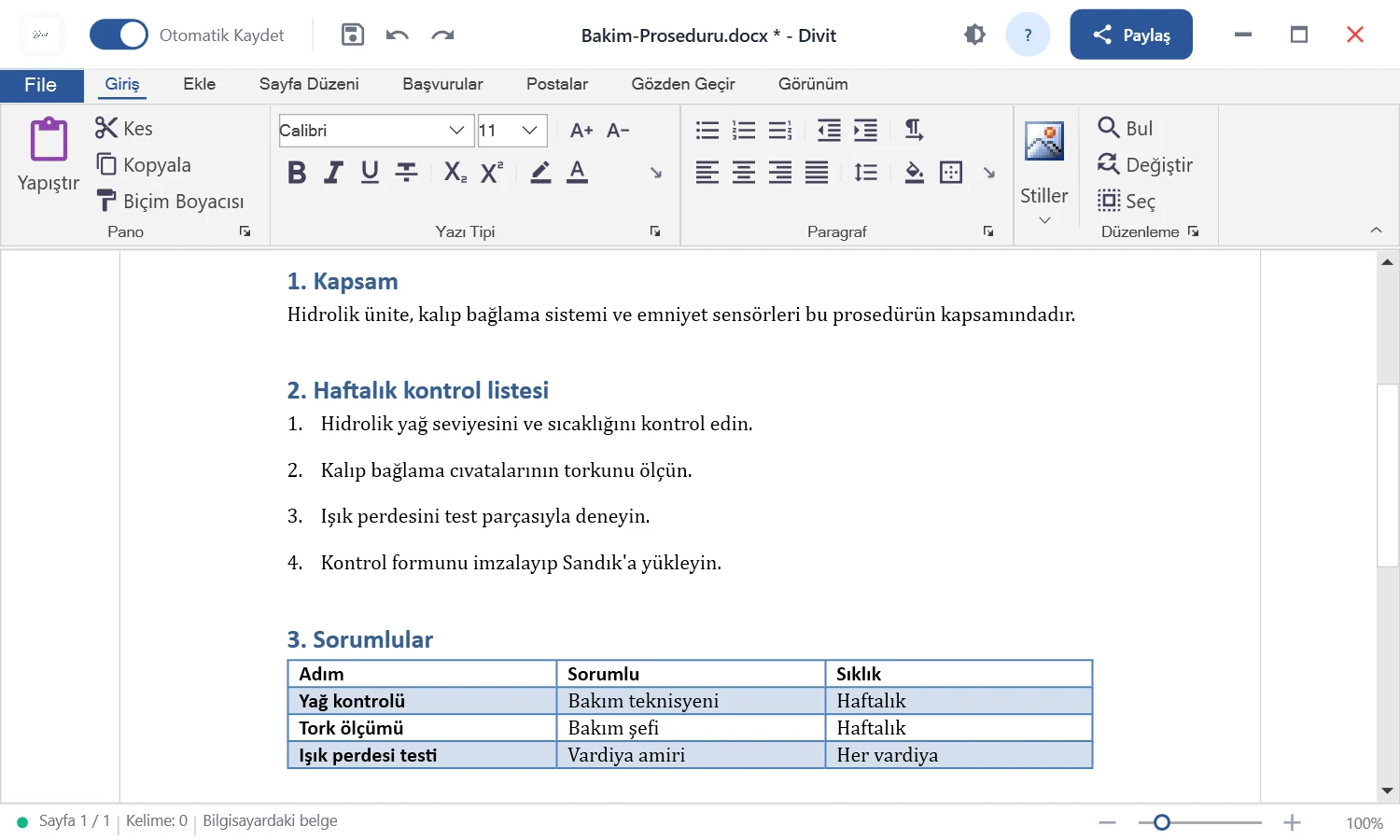
Divit opens and saves .docx and .rtf documents and reads .txt and .html files from Sandık. The formatting ribbon is in Turkish.

Style gallery
Ten ready styles for headings, quotes and body text.
Tables, pictures, links
Insert them, then adjust paragraph and page layout.
Find and replace
With match-case and whole-word options.
Print, export to HTML
Switch between light and dark themes too.

With a business account Divit also opens in the browser, with comments, track changes, a table of contents, form fields and PDF export.

Divit desktop with a maintenance procedure: headings, a numbered list and a responsibilities table

Matris Spreadsheet

Numbers, as they are.

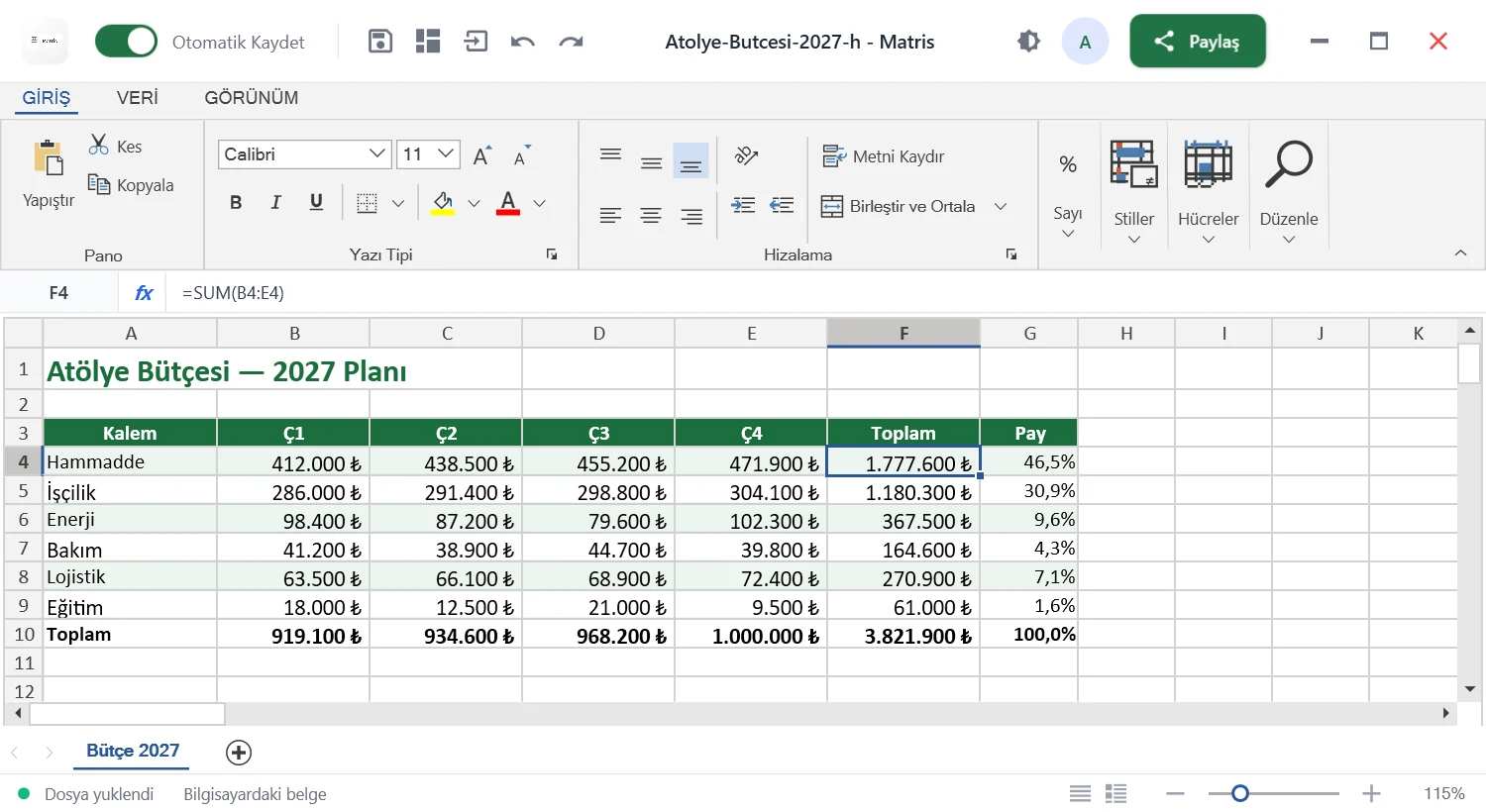
Matris opens .xlsx workbooks, keeps formulas and formatting, and exports to PDF when you need it. A gallery of 29 formulas, with Turkish and English names, drops into the cell in one click.

Formula gallery
SUM, VLOOKUP, IF and 26 more, in Turkish or English.
Data dashboard
A chart and a pie chart from the selected table.
Data from the web
Pull JSON from a URL into the sheet.
Export to PDF
Turn a workbook into a document you can share.

With a business account Matris opens .xlsx, .xls and .csv files in the browser, in Turkish or English.

The 29 supported formulas
Math
TOPLASUMÇARPIMPRODUCTYUVARLAROUNDMUTLAKABSKAREKÖKSQRT
Statistics
ORTALAMAAVERAGEMAKMAXMİNMINBAĞ_DEĞ_SAYCOUNTMEDYANMEDIAN
Text
BİRLEŞTİRCONCATENATESOLLEFTSAĞRIGHTUZUNLUKLEN
Date
BUGÜNTODAYŞİMDİNOWYILYEARAYMONTHGÜNDAY
Lookup
DÜŞEYARAVLOOKUPYATAYARAHLOOKUPİNDİSINDEXKAÇINCIMATCH
Logical
EĞERIFVEANDYADAORDEĞİLNOT
Financial
BDPVGDFV
A workshop budget in Matris: quarterly costs, a total formula and percentage shares

When the connection drops, work doesn't.

Taking a document from Sandık cloud to your computer locks it first, so nobody overwrites it while you work. When you're back, it returns as a new version. Sandık comes with ARC Starter and higher company plans.

  1. Lock and take

    The document is locked and downloaded, encrypted, to your computer. The lock stays with you.

  2. Work offline

    Saves go to the local vault first. Without a connection they queue, and the app still opens.

  3. Return as a new version

    Once you're online the change goes to Sandık as a new version. If there's a conflict nothing is overwritten: your copy is kept as a separate document.

  • Local copies are encrypted to your Windows account.
  • Documents marked “top secret” can't be taken offline.
  • Your password never enters the app; you sign in through the browser.

Sandık

Every version, kept.

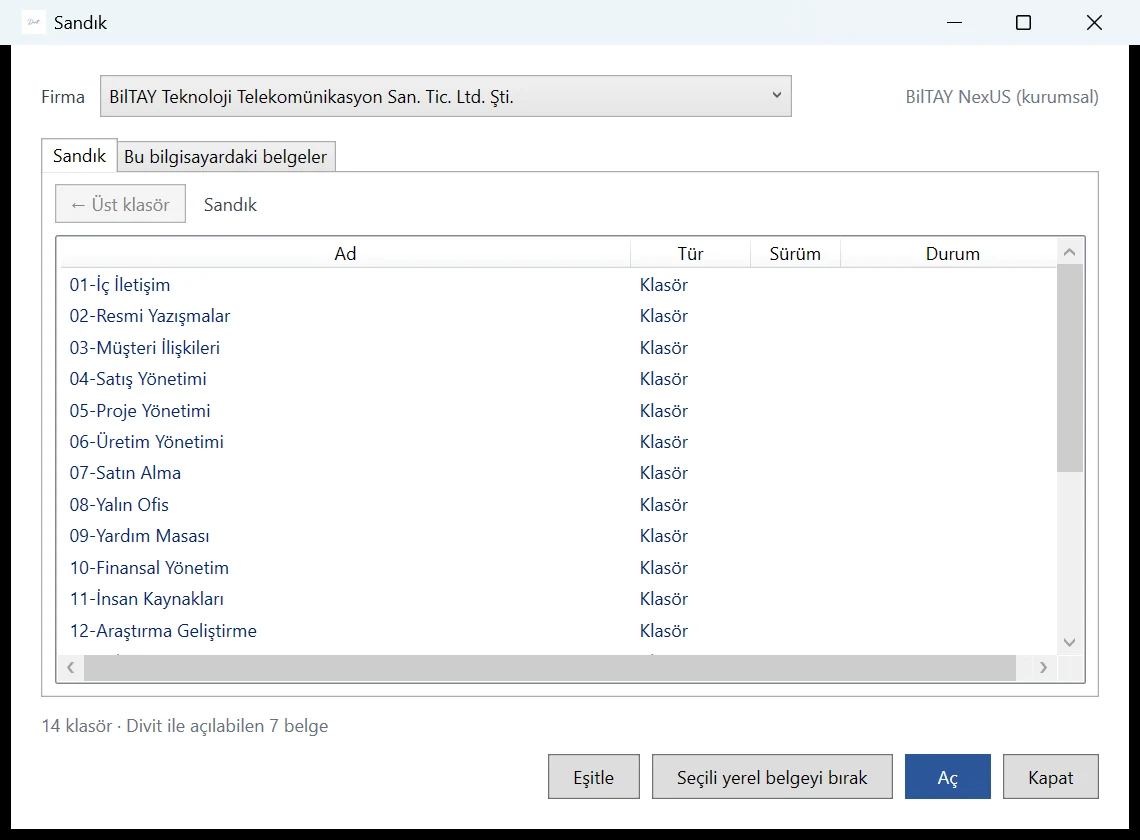
Sandık stores your documents in folders, with their versions. Every save is a new version, and you can go back to any earlier one. Divit and Matris open documents in Sandık directly.

Divit's Sandık window: company selector, folders, version and status columns
Account types
Account typesFree accountBusiness (BilTAY NexUS)
StorageOn your computer15 or 30 GB per user, company pool
Versions and locking—Yes
Offline workYesYes
Sharing—People, groups, departments, with permission levels
Classification—Unclassified, internal, confidential, top secret
Watermarked preview—Stamped with name and date
Divit and Matris in the browser—Yes

Office is free. ARC is for your team.

Divit, Matris and Kurgu are free and need no account: download, install and start. Move to an ARC plan for cloud storage, sharing and AI.

  • Priced in Turkish lira
  • Your data stays in Türkiye (KVKK)
  • Local support
  • Connected to your ERP

Launch pricing for the Republic of Türkiye's 103rd anniversary. Fixed for 12 months if you subscribe by 31 December 2026.

Free

Write, calculate and edit video on your computer.

₺0 ₺0 user / month

Create a free account
  • Divit word processor
  • Matris spreadsheet
  • Kurgu video editor
  • Windows 10 and 11
  • Documents stay on your computer

ARC Starter

Your team's daily work in one place.

₺59 ₺71 user / month From 1 January 2027: ₺129₺155

Request a demo
  • Business email (Seyyah)
  • Söyleşi chat and groups
  • Görüş meetings for up to 100 people
  • Calendar and Tasks
  • Sandık: 15 GB per user, company pool

For teams

ARC Standard

From meeting to decision, from knowledge to work.

₺119 ₺143 user / month From 1 January 2027: ₺249₺299

Request a demo
  • Everything in Starter
  • Görüş recording and Katip minutes
  • Sandık: 30 GB per user, company pool
  • Bilgi Atlası knowledge base
  • AI: monthly quota

ARC Enterprise

ARC, connected to your company's systems.

Tailored to your company

Get a quote
  • Installation on your own server
  • Classification: unclassified, internal, confidential, top secret
  • Offline work
  • Audit trail and single sign-on
  • NexUS links: KAYISI, Scienta, LEADs
  • AI on your own server

Prices are per user per month, billed annually, excluding VAT.Prices are per user per month, billed monthly, excluding VAT. Plans are set up on request for now; there is no online payment.

Download, install, start.

Installers come straight from BilTAY's server. The app tells you about new versions itself and never closes while you're working.

Divit

Word processor

Version
2026.1.13
Released
November 7, 2026
Size
53.2 MB

Download Divit

If Windows shows “Windows protected your PC”, click More info → Run anyway. Code signing for our installer is in progress.

In this version
  • Ortak belgelerde birden fazla paragraf birlikte düzenlenebilir.
  • Paragraf ekleme, birleştirme ve bağlantı sonrası eşitleme iyileştirildi.
Advanced: verify the file

The SHA-256 hash of the file you downloaded should match the one below. In PowerShell: Get-FileHash .\ArcOffice-Divit-Setup-2026.1.13.exe

SHA-256 a5c83620a396c9f84b83562a3e205a0386933e97769b21688a7007a8593928fe

Matris

Spreadsheet

Version
2026.1.13
Released
November 6, 2026
Size
78.6 MB

Download Matris

If Windows shows “Windows protected your PC”, click More info → Run anyway. Code signing for our installer is in progress.

In this version
  • Sandık kayıt çakışması ve eşzamanlı gönderim koruması
  • Yarım kalan şifreli kayıtların kurtarılması ve kilit güvenliği
Advanced: verify the file

The SHA-256 hash of the file you downloaded should match the one below. In PowerShell: Get-FileHash .\ArcOffice-Matris-Setup-2026.1.13.exe

SHA-256 6d73bc20e4e901c006c5aa8a3e9f4bbcb42255adedade8f36cd0fc6217b82c59

Kurgu

Video editor

Version
2026.1.9
Released
November 13, 2026
Size
52.1 MB

Download Kurgu

If Windows shows “Windows protected your PC”, click More info → Run anyway. Code signing for our installer is in progress.

In this version
  • Yeni geçişler: beyaza geçiş, silme (sağa, sola, aşağı, yukarı), kaydırma (sola, sağa) ve daire açılma
  • Parça kartındaki "Sonrakiyle geçiş" satırından süre ve biçim seçilir; süre yokken biçim seçilirse 0,5 sn olur
  • Geçişler Sıkıştır kipinde çıktıya uygulanır (önizlemede görünmez)
  • Geçiş biçimi olan projeler yeni biçimde kaydedilir (eski sürüm açmaz, güncelleme ister)
Advanced: verify the file

The SHA-256 hash of the file you downloaded should match the one below. In PowerShell: Get-FileHash .\ArcMedia-Kurgu-Setup-2026.1.9.exe

SHA-256 80b9631d87fd076acdbca34d53de19e7c4da33633318b1962688745cc9a3dfe9

Windows 10 or 11, 64-bit. Installation needs administrator rights.

On a Mac or Linux, you can use ARC in the browser (business account).

Create a free account.

Divit, Matris and Kurgu are free and need no account: download, install and start. Move to an ARC plan for cloud storage, sharing and AI. An account connects you to the Sandık cloud when you move to an ARC plan. After signing up, confirm your address with the link we email you.

If you have an İMGE account, use it: sign in with the same email and password.

For your whole company.

ARC Office is part of ARC, the digital workspace of the BilTAY NexUS platform. If your company uses NexUS, choose business sign-in in the same apps: documents live in your company's Sandık, and sharing and permissions stay with your administrator.

Explore BilTAY NexUS

On-premises installation

ARC Enterprise is installed on your own server; documents, messages and meeting recordings never leave your company.

  • InfrastructureDocker containers on a Linux server, with a PostgreSQL database. We install and roll it out together with your team.
  • Single sign-onPeople sign in with one account; it can connect to Active Directory, LDAP or Microsoft Entra ID.
  • AIModels run on your own server; content is never sent to an outside service.
  • NetworkIt can run without an internet connection, on your internal network only.
  • SecurityClassification levels, previews stamped with name and date, and an audit trail. Backups follow your own policy.
  • HardwareWe size the server with you, based on the number of users and the apps you use.
Talk to us about installation